

PRO

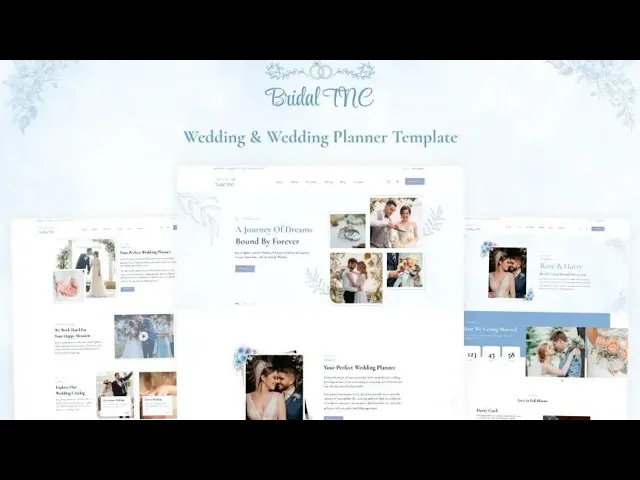


Bridal TNC is a wedding website template for wedding planners, event studios and engaged couples. It ships for Webflow, Figma and HTML.
The template documents the entire wedding narrative in one build. So you get 27 pages, three color ways and a working CMS blog. Because the structure is already set, your only remaining job is replacing names, dates, locations and photography.
Each section has one job. The hero establishes the atmosphere and communicates the date. Then the schedule, gallery, announcement and invitation pages deliver the practical detail your guests or prospective clients require.
The format choice matters. Webflow suits people who intend to manage the site themselves inside a visual editor. HTML suits developers who prefer operating directly in the codebase. Figma suits designers who want to reconfigure the layout before development begins.
Explore the live preview now.
Bridal TNC at a Glance
| Formats | Webflow, Figma, HTML |
| Best for | Wedding planners, event studios, engaged couples |
| CMS | Yes, with blog, authors, categories and tags collections |
| Pages | 27 |
| Color ways | Blue, Pink and Pale |
| Responsive | Yes, desktop through mobile |
| Support | TNCFlow team |
Key Features of Bridal TNC
A complete bridal build. Every page a wedding website needs is already present. So you begin from a finished structure, not a blank canvas.

Modern and trendy design. The visual language is soft, editorial and contemporary. However, nothing is locked down. Typography, color and spacing remain completely adjustable inside the editor.

Gallery showcase. Photography carries a wedding site more than copy does. That is why the gallery grid accommodates high resolution imagery without clutter and without slowing the page.

Wedding announcement. This page communicates the news and the relationship narrative. Then it sends guests on to the schedule, the venue and the invite.

Planning showcase. Planners require demonstrable evidence of previous work. So this layout arranges services, completed events and measurable results alongside each other.

Schedule highlights. Guests always ask the same question first. When does it start? The schedule block answers that within one screen.

Guest information. Travel directions, dress code, venue address and parking arrangements occupy one consolidated block. As a result, far fewer guests message you one by one.

Animations and sliders. The motion here is deliberately understated. It directs attention toward the photography instead of competing against it.

Watch on YouTube
Want the quick version? This short video demonstrates the template screen by screen, including the CMS collections and the three color ways.
Pages Included in Bridal TNC
The template holds 27 pages in total. Several are color ways of the same layout, so you keep whichever ones match your palette and delete the rest. The list covers home, about, pricing, portfolio, contact, blog, announcement and invitation. It also adds CMS templates for blog posts, authors, categories and tags. A styled 404 page is in there too.
- Home-Blue
- Home-Pink
- Home-Pale
- About
- About-Pink
- About-Pale
- Price
- Price-Pink
- Price-Pale
- Portfolio
- Portfolio-Pink
- Portfolio-Pale
- Contact
- Contact-Pink
- Contact-Pale
- Blog
- Announcement
- Announcement-Pink
- Announcement-Pale
- Invitation
- Invitation – Pink
- Invitation – Pale
- Blogs Template
- Authors Template
- Blog Categories Template
- Blog Tags Template
- 404 page
How to Use Bridal TNC
- Use the purchase widget on the right side of this page to buy the Bridal TNC template
- Then follow the setup instructions supplied with your download
- Next, replace the demo content with your own photos, names and dates
- After that, adjust color and type if your brand needs it
- Finally, preview the result on each device size and publish
What Makes a Wedding Website Convert
Wedding buyers split into two groups, and they want different things. Couples want a simple place to share the details. Planners want qualified enquiries. Bridal TNC serves both, although you should set it up with one audience in mind.
Couples should lead with the date and the venue. Guests come to answer one question, so that answer belongs above the fold. Everything else, such as hotels and gift lists, can sit lower down.
Planners should lead with proof instead. Present three completed weddings, then transparent pricing, then the enquiry form. Because credibility is the genuine obstacle, testimonials and photography belong prominently on the page, not in the footer.
Speed matters too. Wedding pages are unusually image heavy, and mobile visitors abandon slow pages quickly. So compress every photo before you upload it, and the site will stay quick on a phone.
Finally, think about the calendar. A couple’s website carries an expiry date, whereas a planner’s website accumulates authority over years. If you are a planner, publish blog content regularly, because the CMS collections exist precisely for that.
Frequently Asked Questions
Is Bridal TNC a Webflow template or an HTML template?
It comes as both. You can buy the Webflow version or the static HTML version, and the Figma file is sold on its own here.
How many pages does Bridal TNC include?
It includes 27 pages. That covers home, about, pricing, portfolio, contact, blog, announcement and invitation layouts, plus CMS templates and a styled 404 page.
Does Bridal TNC include a CMS?
Yes. The Webflow build ships with CMS collections for blog posts, authors, blog categories and blog tags, so you can publish articles without a developer.
What color options come with Bridal TNC?
Three. You get Blue, Pink and Pale versions of the main pages, so you can match a wedding palette without restyling anything manually.
Can wedding planners use Bridal TNC for a business website?
Yes. The portfolio, pricing and contact pages are constructed for service businesses, so planners and event studios can run it as a full agency site.
Is the Figma file included with the template?
No. The Figma file is a separate product on this page. Buy it if you want to redesign the layout before you build.
If you need help, the TNCFlow team answers support questions after purchase.
Check out other Webflow templates by TNCFlow.
Featured in our guides: event website templates.
Select template
Choose one or more options for your build
