
Next.js Themes & Templates
Next.js templates built by our in-house team. Each one is fully responsive, cleanly structured, and ready to customize, so you can go from idea to live site in days
Done for you
Skip the build. We will customize it for you.
Pick any template, tell us what to change, get a launch-ready site back in a week.
FIND THE RIGHT NEXT.JS TEMPLATE FOR YOUR PROJECT
Next.js Website Themes & Templates Core Web Vitals and Ready for Any CMS or API
Complete Next.js website templates built on React. Run them as a static export, render pages on the server, or connect a headless CMS, an API or your own database. They cover business, healthcare, trades, software, retail, hospitality and the nonprofit sector.
Need the design source too? Most templates are also sold as a Figma Template. Or hand the whole job to our team: we customize the site to your brief and put it live for you.
You get the exact same copy of the template:When you buy a Next.js template from TNCFlow, you get the full project behind the preview: every page, all the copy, images and video. Install Node.js and npm, run the project locally, and follow our documentation for step-by-step directions on editing pages, changing styles and connecting a CMS or database.
WHAT ARE NEXT.JS TEMPLATES?
What a Next.js Template Is, and What It Is Not
/ 01
What you get
A Next.js project with reusable React components, a defined type scale and color system, motion, responsive layouts, and step-by-step documentation. Everything you need to connect a CMS, an API or a custom database.
/ 02
What you can do with it
Change the design, swap content and assets, add pages and components, connect your data, and launch the site for yourself or for one client. See the license policy for exactly what one purchase covers.
/ 03
What it is not
It is not a finished site with your content, and it is not a full web app. You still add your own content and connect any CMS or database you need. Logins, dashboards and payments are custom work on top of the template.
/ 04
Who it suits
Developers, agencies and teams who know React and want to skip weeks of design and front-end build, then ship a professionally designed Next.js site for their business or a client.
We have done half the work already, and we are happy to do the other half. If you would rather hand over content entry, branding, CMS setup or a custom database, our development team is ready. Request a quote with your brief.
NEXT.JS TEMPLATES BY INDUSTRY
Choose a Next.js Template by What Your Organization Does
Nonprofit, Public and Community
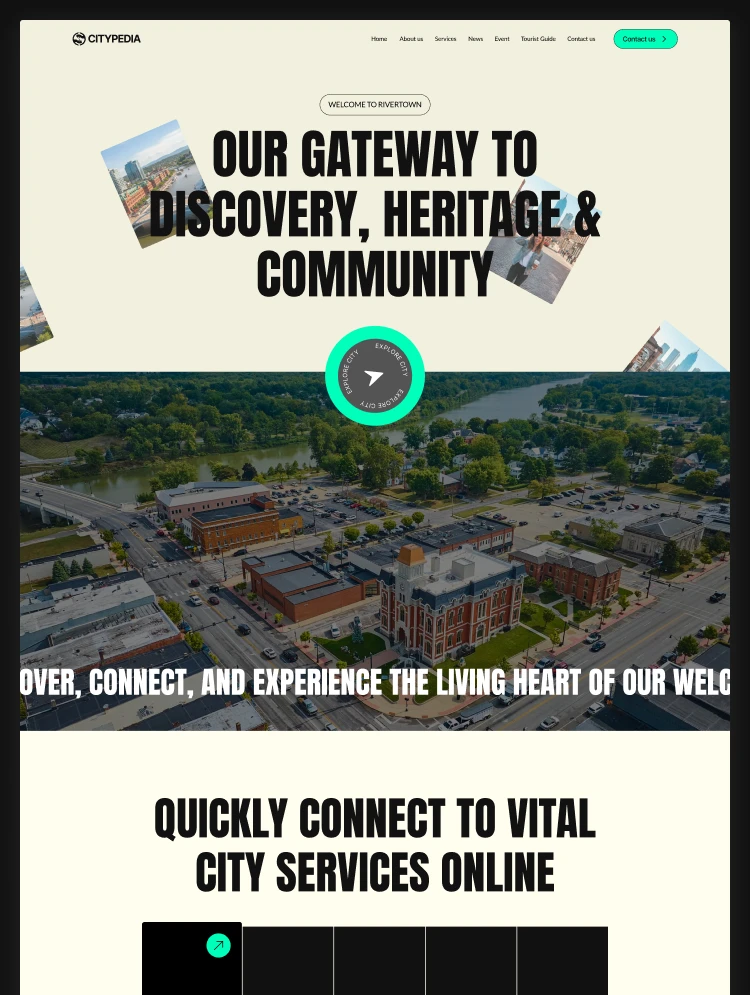
Citypedia, for city governments, councils, municipal service teams and nonprofits. It leads with services, then news, events and city leadership.
More industries are on the way
We are adding Next.js versions of our templates regularly. Until your industry is covered here, you can browse the same designs in other formats in the full template catalog, or request a quote for a custom Next.js build.
A note on inventory: Use the search and filters at the top of this page for the current list. New Next.js templates appear there first.
Ways to Build
Three Ways to Get From a Next.js Template to a Live Site
01: DIY
Go Live Yourself
02: Hire Someone
Hire a Developer to Go Live
03: Custom Dev
Have us build it
Our in-house designers and full-stack developers are the same people who built the demo. We handle customization, CMS and API integration, and custom features such as logins or dashboards. See our development & AI services or request a quote.
Not sure which route fits your budget and timeline? Book a free consultation and we will tell you honestly, including when a ready-made template is cheaper than paying anyone to build from scratch.
Pick Your Platform
Next.js, Astro, Webflow, Framer or HTML?
01 · You are here
Next.js
02
03
04
A working site with a relational CMS and a native store. Best when non-technical people must publish content.
There are also free templates if you want to inspect the file structure before spending anything, and full details about subscriptions of all access plans on the pricing page.
Next.js Templates Reality Check
When a Next.js Template Is Not the Right Buy
If You Need No Code Editing Experience
If Your Site Is Pure Content
If Nobody Will Maintain the Code
Whatever the job, from design and development to customization and maintenance of a website, store or web app, team TNCFlow can help. Request a quote to get started.
FAQ
Frequently Asked Questions
The questions buyers ask most before choosing a Next.js build.
What is a Next.js website template?
Can I publish a Next.js template as a website?
Do Next.js templates include a CMS?
Are the templates responsive?
Yes. Every template is designed and tested for desktop, tablet and mobile.
Can I use a Next.js template for client work?
Do Next.js templates help with SEO?
What if I need changes the template does not cover?
Our team can add features, integrate your CMS or database, or build custom functionality on top of the template. Request a quote or contact our support team with what you need.