

Free Figma templates save you from starting every project on a blank frame. A good one gives you a finished layout, a type scale and a set of components that you can restyle in an afternoon. A bad one gives you detached layers, missing fonts and a design that falls apart the moment you change the copy.
This list covers both kinds of file people look for: free Figma website templates, which are full page designs for a specific type of business, and free UI kits, which are component libraries you build your own screens from. Every numbered item here is free to get. Nothing on the list is a paid product with a trial.
The first three are our own free files from the TNCFlow free templates collection. The rest are free files from Figma Community and well known makers. If you outgrow the free options, there is a short section on paid upgrades near the end.
Quick picks
| Template | Best for | Price |
|---|---|---|
| HomeSalon TNC | Salon and barbershop sites | Free |
| Ornox | Jewelry and accessory stores | Free |
| KidZone | Daycare and kids brands | Free |
| Simple Landing Page Templates | Quick landing page layouts | Free |
| Free Portfolio Landing Page Template | Personal portfolios | Free |
| Untitled UI Free | General purpose UI kit | Free |
| Simple Design System | Learning modern Figma features | Free |
| Material 3 Design Kit | Android and Material apps | Free |
| iOS 18 and iPadOS 18 | iPhone and iPad apps | Free |
| Obra shadcn/ui kit | Designs that ship with shadcn/ui | Free |
The best free Figma templates
1. HomeSalon TNC
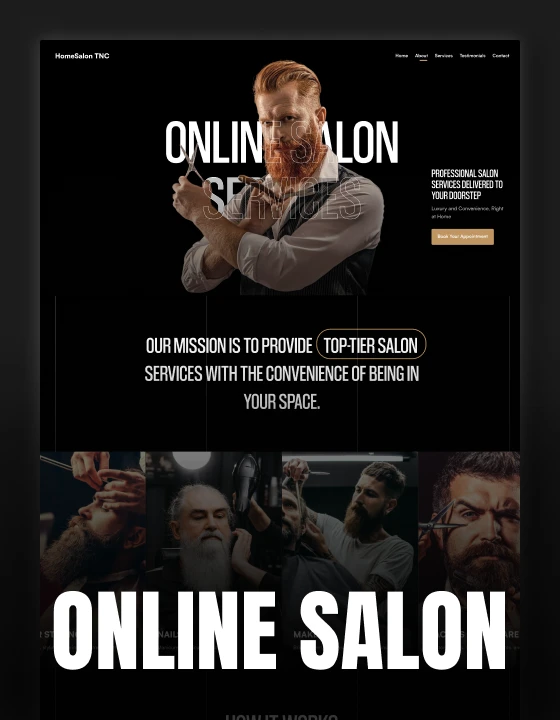
HomeSalon TNC is a salon website template made for hair salons, barbershops and mobile beauty services. It is a good starting file if you design for local service businesses, because the page order already matches how those customers decide: what you offer, how booking works, what other clients say, then the appointment form.
The design is a dark, single page layout with sections for services, how it works, testimonials and booking an appointment. A single page is easier to adapt than a ten page file, so it also works well as a practice project if you are still learning Figma.
The Figma file is free on TNCFlow. The same design also exists for Webflow, Framer and HTML, and those versions are currently free too, so you can take the design to a live site without rebuilding it.
HomeSalon TNC is free to download.
2. Ornox
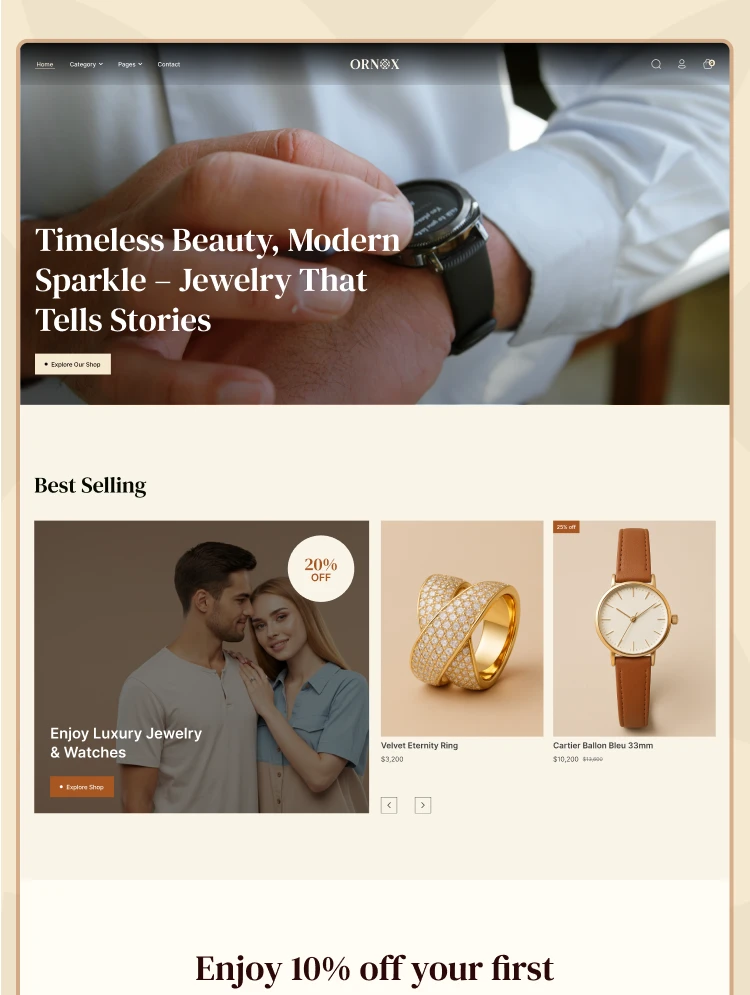
Ornox is a jewelry website template for jewelry stores, watch retailers and fashion accessory brands. Free Figma website templates for stores are hard to find, since most free files are generic landing pages, so this one is useful if you need a shop design to present to a client.
The layout is built around product photography, which is what a jewelry brand needs. Use it as the base for any store where the product images do the selling, and swap the palette and type to match the brand.
The Figma file is free on TNCFlow. Ornox also ships for Webflow, with CMS and Ecommerce included, and for HTML, and both of those versions are free as well.
Ornox is free to download.
3. KidZone
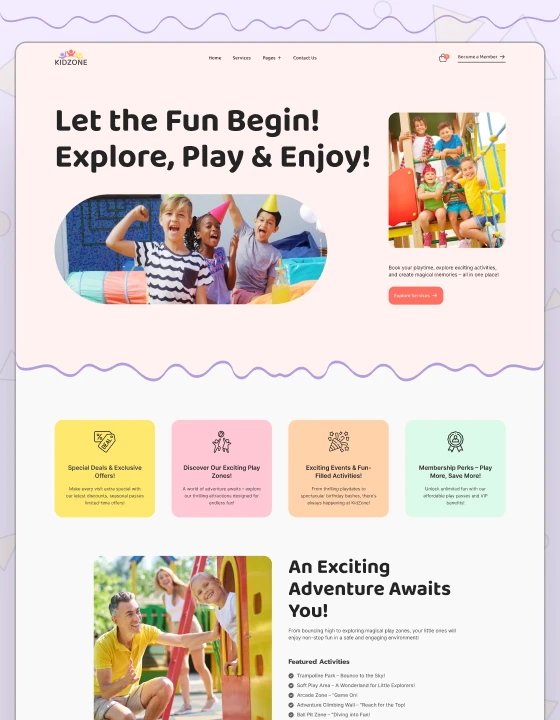
KidZone is a daycare website template for childcare centers, indoor play zones and kids stores. It suits designers who work with schools, nurseries and family brands, where the tone has to be friendly without looking childish.
It is the most complete of our three free files in terms of what the design is meant to support, because the Webflow version includes both CMS and Ecommerce. That means the Figma design covers content pages as well as shop pages.
The Figma file is free on TNCFlow. KidZone is also available for Webflow and HTML, and those versions are free too.
KidZone is free to download.
4. Simple Landing Page Templates
A Figma Community file that offers seven free landing page layouts in one download. It is a practical pick when you need a clean starting structure for a product or service page and plan to replace all the styling anyway. Check the license shown on the Community page before using it in client work.
Simple Landing Page Templates is available from Figma Community.
5. Free Portfolio Landing Page Template
A free portfolio landing page on Figma Community. It works for designers and developers who want a single page personal site with an intro, selected work and a contact section. Duplicate it, replace the projects with your own and you have a draft to build from.
Free Portfolio Landing Page Template is available from Figma Community.
6. Untitled UI Free
Untitled UI is one of the best known Figma UI kits, and it has a free version. The maker lists more than 2,000 components and variants, over 350 global styles, more than 20 page examples and over 900 icons and logos in the free file, and says it can be used in unlimited projects. The free version leaves out things like Figma variables and dark mode variables, which are part of the paid kit.
Untitled UI Free is available from Untitled UI.
7. Simple Design System
Simple Design System is published by Figma itself. It is a small, neutral component library that shows how Figma expects a modern system to be set up, so it is as much a learning file as a kit. Pick it if you want to understand how a well organised library is structured before you build your own.
Simple Design System is available from Figma Community.
8. Material 3 Design Kit
The Material 3 Design Kit is the Material Design team’s kit for Figma. If you are designing an Android app, or any product that follows Material guidelines, this is the correct starting point because the components match what developers get in code.
Material 3 Design Kit is available from Figma Community.
9. iOS 18 and iPadOS 18
Apple publishes its own UI kits on Figma Community, and this is the one for iOS 18 and iPadOS 18. It gives you the system components, so your iPhone and iPad mockups look native. Apple releases a new kit for each system version, so check its Community profile for the latest one.
iOS 18 and iPadOS 18 is available from Figma Community.
10. Obra shadcn/ui kit
Obra Studio maintains a free Community Edition of its shadcn/ui kit for Figma. It follows the shadcn/ui components, so it is a sensible choice when your developers build with that library and you want design and code to line up. A paid Pro version exists, but the Community Edition is free.
Obra shadcn/ui kit is available from Figma Community.
How to choose a free Figma template
Start with what you are making. A website template and a UI kit solve different problems, and picking the wrong type costs more time than it saves.
- Website for a client or business: choose a website template in the same niche, such as HomeSalon TNC for a salon or Ornox for a store. The section order is already worked out.
- App or dashboard: choose a UI kit. Use Apple’s kit for iOS, the Material 3 kit for Android, and Untitled UI or the Obra shadcn/ui kit for web apps.
- Check the license: free does not always mean free for commercial work. Read the license on the Community page or the maker’s site before you use a file for a paying client.
- Check the build path: if the design has to become a live site, a template that also exists for Webflow, Framer or HTML saves the rebuild.
- Open the file before you commit: look for auto layout, named layers and real components. Flat, ungrouped layers mean slow editing.
When to upgrade to a paid Figma template
Free files cover a limited set of niches. If your project is a corporate site, a SaaS product or an agency, a paid file usually costs less than the hours you would spend stretching a free one. These four are good next steps from the TNCFlow Figma templates catalog. Each purchase covers one website.
- MNC, $25 for Figma: a corporate website template for multinational groups, enterprise service firms and professional services companies. Also available for Webflow, Framer, HTML and Astro.
- Scalepro, $25 for Figma: an AI SaaS website template for automation platforms, lead generation tools and growth agencies, with features, integrations, pricing and blog pages. Also available for Webflow, Framer and HTML.
- Somers, $30 for Figma: an agency website template for creative agencies, social media studios and digital marketing teams. Also available for Webflow, Framer and HTML.
- FounderSphere, $50 for Figma: a resume and personal website template, for founders and consultants who need a personal site. Also available for Webflow.
Want it built for you?
A Figma file is only the design. If you would rather not handle the build, the TNCFlow team can customise any of our templates to your brand and launch it for you on Webflow, Framer or HTML. Book a free call to talk it through.
Frequently asked questions
Are these Figma templates really free?
Yes. Every numbered item on this list is free to get at the time of writing. The three TNCFlow files are free downloads, and the others are free files on Figma Community or the maker’s site. Some makers also sell a paid version with more features.
Where can I find free Figma website templates?
Figma Community has thousands of free website files, and TNCFlow keeps its free ones on the free templates page. Niche designs, such as a salon, jewelry store or daycare site, are usually faster to adapt than a generic landing page.
Can I use free Figma templates for client work?
Often yes, but it depends on the file. Each Figma Community file shows its license on its page, and makers like Untitled UI publish their own terms. Read the license before you use a free file in paid work.
What is the difference between a Figma template and a UI kit?
A template is a finished design for a specific use, such as a salon website. A UI kit is a library of parts, such as buttons, inputs and cards, that you assemble into your own screens. Website projects usually start from a template, and apps usually start from a kit.
Can I turn a free Figma template into a live website?
Yes, but someone has to build it in Webflow, Framer or code. The three TNCFlow files on this list also exist as built templates on other platforms, which removes that step.