

PRO

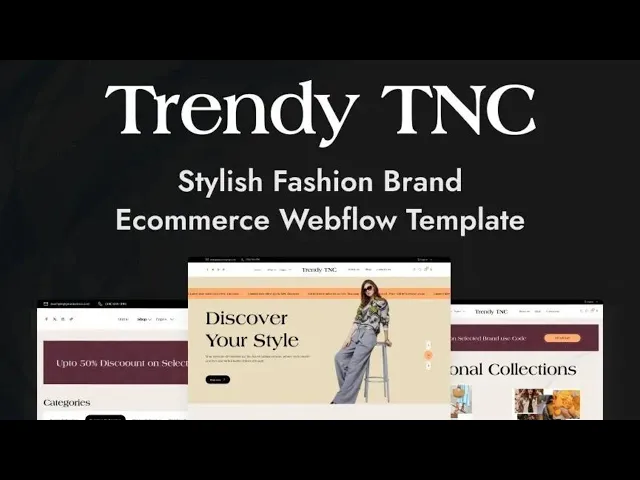


Trendy TNC is a fashion website template for clothing brands, boutique stores and streetwear labels. It ships for Webflow, Figma and HTML.
The template pairs Webflow Ecommerce with Webflow CMS. So you can merchandise a catalog and publish editorial content inside a single Webflow project. Product pages, category pages, checkout and order confirmation are already designed and connected. Because the cart is native Webflow Ecommerce, transactions run without an external payment plugin.
Every section has one job. The lookbook sells the mood. Then the shop pages sell the products. Meanwhile the collections page handles filtering and discounts. Sliders and scroll animations carry the eye between them.
You can buy Trendy TNC in three formats. The Webflow version arrives as a cloneable project. The HTML version ships as static files you can host anywhere. The Figma version is a design file, sold on its own for teams that want to redesign first.
Explore the live preview now.
Trendy TNC at a Glance
| Formats | Webflow, HTML and Figma |
| Best for | Clothing stores, fashion boutiques and streetwear brands |
| CMS | Yes, Webflow CMS |
| Ecommerce | Yes, native Webflow Ecommerce |
| Pages | 33 pages and CMS templates |
| Shop layouts | Two |
| Responsive | Desktop, tablet and mobile |
| Support | TNCFlow support team |
Key Features of Trendy TNC
Modern fashion design. The layout follows current retail merchandising conventions, with generous whitespace and oversized editorial typography. Product photography leads every section. So the storefront communicates a premium positioning before a visitor clicks anything.

CMS and Ecommerce together. The project ships with both Webflow CMS and Webflow Ecommerce enabled. You can publish lookbook stories, announcements and journal entries through the CMS collections. Meanwhile the identical project administers products, inventory and customer orders.

Two shop layouts. You get two independent shop pages, so you can evaluate which product grid converts better for your catalog. One layout emphasizes large imagery, while the other presents a denser assortment. Both accommodate product sliders and high resolution photography.

Event page. Fashion brands run drops, pop ups and runway nights. This page announces such an occasion. Because it inherits the styling of the storefront, the announcement never appears bolted on.

Collections page. Here you organize garments by product line, seasonal collection or promotional discount. Filtering and unambiguous navigation help shoppers narrow their selection quickly. That way reduced items remain immediately discoverable.

Lookbook page. A lookbook shows clothes in context rather than on a plain background. So it performs the styling work that a conventional product grid cannot accomplish. Boutiques and streetwear labels rely on it to establish atmosphere.

Animations and responsive sliders. Motion is deployed to reveal merchandise rather than to decorate the interface. Sliders adapt to smaller viewports without cropping the garment awkwardly. However you can reduce or remove these effects inside Webflow if you prefer a calmer storefront.

Blog showcase. The blog page is constructed for comfortable reading, with unambiguous headings and a straightforward index. Because it operates on Webflow CMS, publishing an additional article takes minutes.

Watch on YouTube
This short video walks through the Trendy TNC layout. Watch it if you want to see the shop, lookbook and checkout in motion before you buy.
Pages Included in Trendy TNC
- Home
- About
- Blog
- Contact
- Event
- FAQ
- Shop (Ecommerce)
- Shop-2 (Ecommerce)
- Collections
- Lookbook
- Utility
- Default Template
- Teams Template (CMS)
- Products Tags Template (CMS)
- Services Template (CMS)
- Blogs Template (CMS)
- Authors Template (CMS)
- Blog Categories Template (CMS)
- Blog Tags Template (CMS)
- Products Template (Ecommerce)
- Categories Template (Ecommerce)
- Checkout (Ecommerce)
- Checkout (PayPal) (Ecommerce)
- Order Confirmation (Ecommerce)
- Log In
- Sign Up
- Reset Password
- Update Password
- Access Denied
- User Account
- 404
- Password
- Search Results
How to Use Trendy TNC
Setup is straightforward. Here are the steps.
- Use the purchase widget on the right side of this page to buy the Trendy TNC template
- Follow the setup steps to get your site ready
- Replace the demo content with your own products and photography
- Adjust colors and type if you want
- Preview the site and publish it
What to Look For in a Fashion Website Template
Fashion buyers evaluate an unfamiliar store within seconds of arriving. So the opening screen matters considerably more than the accompanying feature list. Look for three things before you commit. First, check that product photography can run full width, because clothing sells on scale and detail. Second, check that the template ships a real checkout rather than a link to another platform. Third, check that the mobile layout keeps the garment in frame. Most fashion traffic arrives on a phone. A template that crops sleeves and hems on mobile will cost you sales, however good it looks on a laptop.
Trendy TNC Frequently Asked Questions
Is the Figma file included with Trendy TNC?
No. The Figma file is a separate product with its own price. So you can buy the Figma design on its own, or buy the Webflow or HTML build on its own. Use the purchase widget on this page to pick the format you want.
Does Trendy TNC handle online payments?
Yes. The template uses native Webflow Ecommerce, so cart, checkout and order confirmation are built in. It also includes a PayPal checkout page. You connect your own payment account in Webflow.
How many shop pages does Trendy TNC include?
Two. Both are full shop layouts with different product grids. That way you can pick the one that suits your catalog size.
Can I use Trendy TNC without Webflow?
Yes. The HTML version is a static build you can host on any server. However the CMS and Ecommerce features are Webflow features, so the HTML build does not include them.
Is Trendy TNC responsive on mobile?
Yes. Every page is built for desktop, tablet and mobile. Sliders and product images resize rather than crop awkwardly.
Can I sell products other than clothing?
Yes. The Ecommerce setup is generic, so it works for accessories, footwear, jewelry and homeware. You only need to swap the photography and category names.
When you choose Trendy TNC, you get support from the TNCFlow team. Ask us anything about setup and we will help.
Check out other Webflow templates by TNCFlow.
Featured in our guides: Webflow salon and spa templates and Webflow ecommerce templates.




Select template
Choose one or more options for your build
