


A Figma wireframe kit is a library of ready-made blocks, such as headers, heroes, pricing tables and footers, that you drag together to plan a page before any visual design happens. A good one turns a day of drawing boxes into an hour of arranging them.
This list is for designers, founders and agencies who need to get layouts in front of a client quickly. We compare eight wireframe kits from other creators, free and paid. We do not sell a wireframe kit ourselves. What we do have is finished Figma templates, and for many standard websites starting from one of those is quicker than wireframing at all. That option is covered after the kits.
Quick Picks
| Kit or template | Best for | Price | Link |
|---|---|---|---|
| Outline | Detailed, annotated web wireframes | $60 | The Designership |
| BRIX Website Wireframes | Free marketing site wireframes | Free | BRIX Templates |
| Figkit | Web apps and dashboards | $59 | Figkit |
| Relume Figma Library | Figma to Webflow teams | See site | Relume |
| SeaWire | Landing pages | Envato Elements | Envato Elements |
| Merge | Multi-tool teams | Envato Elements | Envato Elements |
| WeDot | Bootstrap layouts | Envato Elements | Envato Elements |
| heywires | A simple, cheap component set | $19 | Creative Market |
| TNCFlow Figma templates | Skipping the wireframe stage | Free to $50 | Browse templates |
The Best Figma Wireframe Kits
Details below come from each kit’s own page. Creators update kits and prices, so confirm before you buy.
1. Outline by The Designership
Outline is the most complete kit on this list, with more than 740 components and over 90 page templates, built with auto layout and an annotation library for handoff notes. It costs $60 for an individual license. Best for designers who wireframe websites regularly and want detailed, annotated layouts.
2. Website Wireframes UI Kit by BRIX Templates
A free kit with desktop and mobile versions of every section, including a wide choice of heroes, headers, pricing tables and footers. Best for putting together marketing site wireframes section by section without spending anything.
BRIX Templates Figma resources.
3. Figkit
Figkit is built around Figma auto layout and aimed at web apps and dashboards. Template screens come in desktop and mobile versions, and native iOS components are included. It costs $59 as a one-time purchase.
4. Relume Figma Library
Relume offers a library of more than a thousand components, each with a mobile variant, and it mirrors the Relume library for Webflow. Best for teams that design in Figma and build in Webflow. See the Relume site for current pricing.
5. SeaWire
SeaWire has 200 ready-made layouts in 15 categories and six complete landing pages. Best for landing page wireframes. It is included with an Envato Elements subscription.
6. Merge Wireframing UI Kit
Merge includes 185 elements and components and 36 example layouts for web and mobile, and it works in Figma, Adobe XD, Sketch and Illustrator. Best for teams that use more than one design tool. It is included with an Envato Elements subscription.
7. WeDot Wireframe UI Kit
WeDot has more than 170 layouts in 17 categories on a 12 column Bootstrap grid. Best when the site will be built in Bootstrap and you want the wireframe to match the grid. It is included with an Envato Elements subscription.
8. heywires
heywires is a small, low cost set of UI components for wireframing, priced at $19 on Creative Market. Best if you want a simple component set and nothing more.
Skip the Wireframe: Start From a Finished Figma Template
Wireframes earn their place when the structure of a product is unknown. For a standard website, such as a company site, a clinic, a store or a portfolio, the structure is already well understood. In those cases a finished Figma template gives you the layout and the visual design in one file, and you spend your time on content and brand instead of boxes.
Three of our Figma files are free, so you can try the approach at no cost. Paid Figma files run from $15 to $50, and most have matching Webflow, Framer or HTML builds for when the design is approved.
9. HomeSalon TNC

A free Figma file of a dark, single page salon and barbershop site with services, testimonials and booking sections. A good way to see how our Figma files are organized before you buy one.
10. KidZone
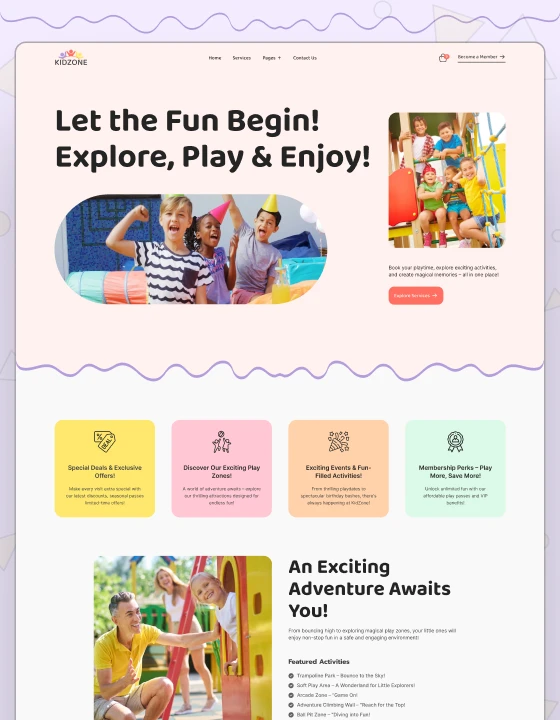
A free Figma file for childcare centers and kids stores, with a full set of pages. Useful as a base for any friendly, family-focused site.
11. Ornox

A free Figma file for jewelry and accessory stores, designed around product photography. A solid starting point for small store designs.
12. MNC

A corporate website design for multinational groups and professional services firms, at $25 for the Figma file. The matching Webflow, Framer, HTML and Astro builds are available when you are ready to develop it.
MNC is available now.
13. Dossier
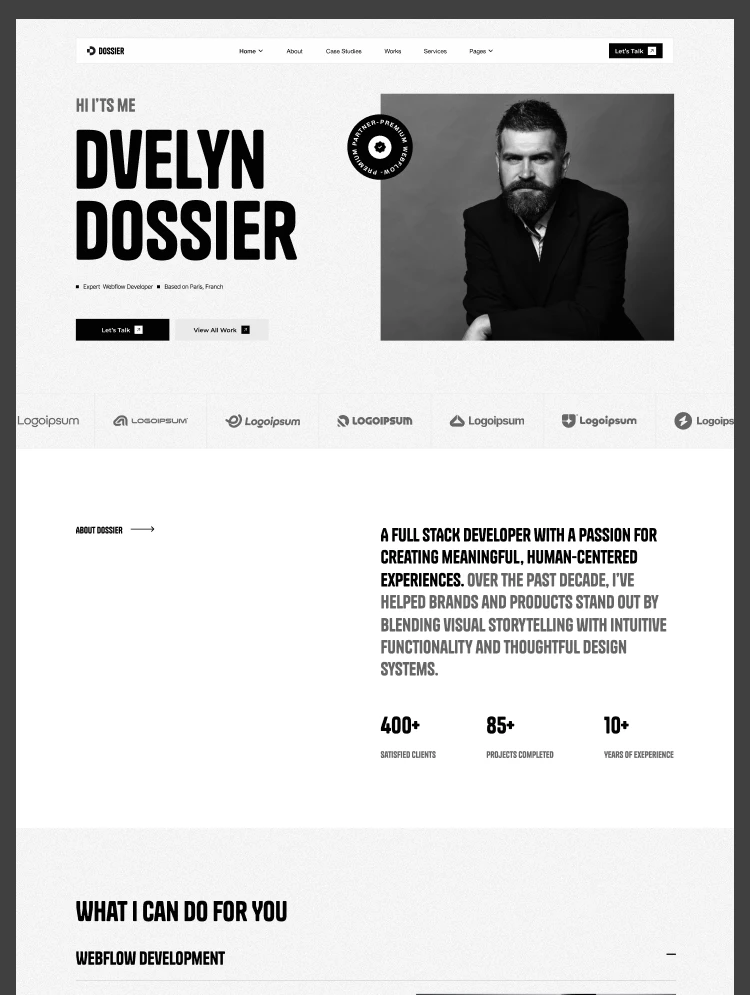
A resume and portfolio design with three home page variants, case studies and a services page, at $30 for the Figma file. Suited to consultants and freelancers.
Dossier is available now.
Low Fidelity or High Fidelity?
Low fidelity wireframes are grayscale boxes and placeholder text. They are quick to make and keep feedback focused on layout, navigation and content order. High fidelity wireframes look close to the final design, with real fonts, colors and images, and they take much longer per screen.
Use low fidelity when the structure is still open or several people need to agree on it. Go straight to high fidelity, or to a finished template, when you already have a design system or the site follows a familiar pattern.
How to Choose a Figma Wireframe Kit
- Web or app. Marketing site kits are organized by section. App kits are organized by screens and states. Pick the one that matches your project.
- Auto layout. Kits built with auto layout resize properly when you change text. Without it you will fix spacing by hand.
- Desktop and mobile. Check that every block has a mobile version if you present responsive layouts.
- Depth over count. A large component count sounds good, but a smaller kit with the sections you use is faster to work with.
- Path to build. If the site will be built in Webflow or Framer, a kit or template that mirrors components on that platform saves rework.
Want It Built for You?
We can take a project from Figma to a live site. That can be one of our templates with setup, content and branding handled for you, or a custom design and build in Webflow, Framer, WordPress or Astro.
Book a free call to talk it through.
Related Reading
See our guides to the best Figma portfolio templates and the website template bundle for Webflow, Framer, HTML and Figma, or browse the Webflow templates and Framer templates hubs.
Frequently Asked Questions
What is a Figma wireframe kit?
It is a Figma file of reusable layout blocks and components, such as navigation bars, heroes, forms and footers, that you combine to plan pages before visual design starts.
Are there free Figma wireframe kits?
Yes. BRIX Templates offers a free website wireframe kit, and the Figma Community has many more. Paid kits usually add more components, auto layout and page templates.
Do I need a wireframe kit for a small website?
Often not. For a standard company site or portfolio, starting from a finished Figma template is usually faster, because the structure is already proven.
What is the difference between a wireframe kit and a UI kit?
A wireframe kit is deliberately plain and focuses on layout. A UI kit contains styled, final-looking components with colors and typography, used to produce the finished design.
Can a wireframe become a Webflow or Framer site?
Yes. The wireframe sets the structure, the visual design is applied on top, and the result is built in Webflow or Framer. Kits and templates that match components on those platforms make this step quicker.