

PRO

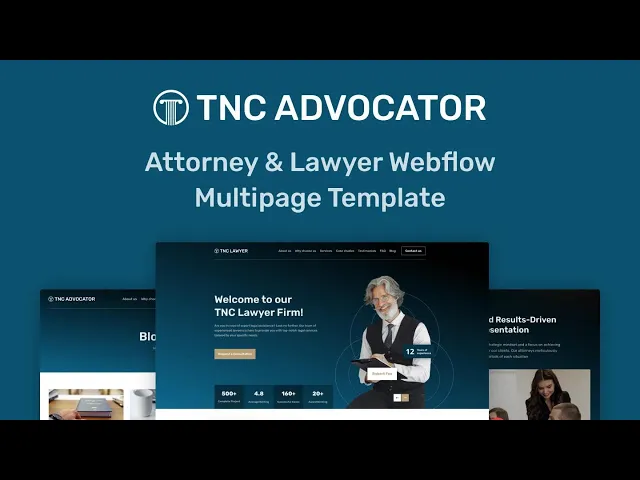


TNC Advocator is an attorney website template for law firms, solo lawyers and legal consultants. It ships for Webflow, Figma and HTML.
The layout puts your practice areas, your litigation results and your consultation form within easy reach. So a prospective client can evaluate your firm in seconds. Because legal buyers are cautious, the design leans heavily on credibility. Testimonials, case studies and detailed service pages carry that responsibility.
Each section has one job. The hero identifies who you represent. The services grid names your practice areas, from personal injury to family law. Then the case study collection demonstrates outcomes, and the contact block closes the visit. Webflow CMS drives the blog and the case studies, so your marketing team can publish without touching the design.
Explore the live preview now!
TNC Advocator at a Glance
| Formats | Webflow, Figma and HTML |
| Best for | Law firms, attorneys, legal consultants |
| CMS | Yes, blog and case studies |
| Static pages | 10 |
| CMS collection templates | 2 |
| Responsive | Yes, on mobile, tablet and desktop |
| Support | TNCFlow support team |
Key Features of TNC Advocator
Responsive design. The layout maintains its proportions on phones, tablets and wide monitors. So a client who discovers your firm on a phone still receives a professional presentation. Typography stays legible and buttons remain easy to tap.

CMS included. Webflow CMS powers the blog and the case study collections. That way your team can publish a new article without opening the designer. Collection fields are already mapped, so you only supply the copy and imagery.

Effective sections. You get a hero, a services grid, a case study feed, testimonials, a blog listing, an FAQ accordion and a call to action. Each component is built and styled already. Because of that, you can remove whatever you do not need instead of building from zero.

Newsletter signup. A subscription block sits immediately above the footer. It connects to Webflow forms out of the box. So you can accumulate a list of prospective clients while they research you.

Sliders and interactions. Touch-friendly sliders carry testimonials and imagery on every device. Subtle animations trigger on scroll. However, the motion remains restrained, which suits a conservative legal brand.

Watch on YouTube
Watch the video walkthrough if you want an immediate tour. It demonstrates the pages, the CMS configuration and the styling in a few minutes.
Pages Included in TNC Advocator
The template ships with 10 static pages. Those are Home, About, Services, Blog, Contact, Search, a 404 page, a style guide, a licence page and a change log. Then there are 2 CMS collection templates, one for blog articles and one for case studies. So your published page count expands as you add content.
How to Use TNC Advocator
- Use the purchase widget on the right side of this page to buy the TNC Advocator template
- Follow the steps to prepare your site
- Replace the demonstration content with your own
- Adjust colours and typography if you want
- Then preview and publish
What Legal Buyers Look For on a Law Firm Website
What does a prospective client verify first? Usually two things. They confirm whether you handle their particular kind of matter, and they confirm whether other people trusted you previously. So practice areas and social proof belong above the fold.
Credibility signals matter more in this category than in most. Bar admissions, years in practice, jurisdictions covered, named case results and genuine client quotes all contribute. However, accuracy is not optional. Legal advertising rules in many jurisdictions restrict testimonials and outcome claims, so review your state bar guidance before publishing anything.
Speed and contact clarity also convert. Many legal searches happen on a phone during a stressful moment. Because of that, a visible telephone number and a short consultation form outperform a lengthy intake questionnaire. Consider adding a dedicated landing page for each major practice area too. Search behaviour is specific, so somebody searching for a divorce attorney rarely lands on a generic homepage and stays.
Finally, remember that a template is a starting position. Photography of your actual attorneys and office beats stock imagery every time. So budget for a short photography session before launch.
Frequently Asked Questions
What formats does TNC Advocator come in?
TNC Advocator ships for Webflow, Figma and HTML. Each format is purchased separately, so you can buy only the one your team will actually use.
Is the Figma file included with the Webflow purchase?
No. The Figma file is a separate product on this page. If you want the design source, purchase the Figma version alongside the Webflow or HTML build.
Does TNC Advocator include a CMS?
Yes. The Webflow version uses Webflow CMS for the blog and for case studies. So your team can publish new content without editing the underlying layout.
How many pages does TNC Advocator include?
It includes 10 static pages plus 2 CMS collection templates. Those collection templates generate a page for every blog article and every case study you add.
Can I use TNC Advocator for a practice that is not law?
Yes. The structure suits any professional services firm, such as accountants, consultants or financial advisors. You only need to rename the practice area sections.
Do I get support after buying TNC Advocator?
Yes. The TNCFlow support team answers setup and customisation questions after purchase.
When you choose TNC Advocator, you get support from the TNCFlow team. Ask us anything about setup, and we will help.
Check out other Webflow templates by TNCFlow.
Featured in our guides: consulting website templates and lawyer website templates.




Select template
Choose one or more options for your build
