

PRO

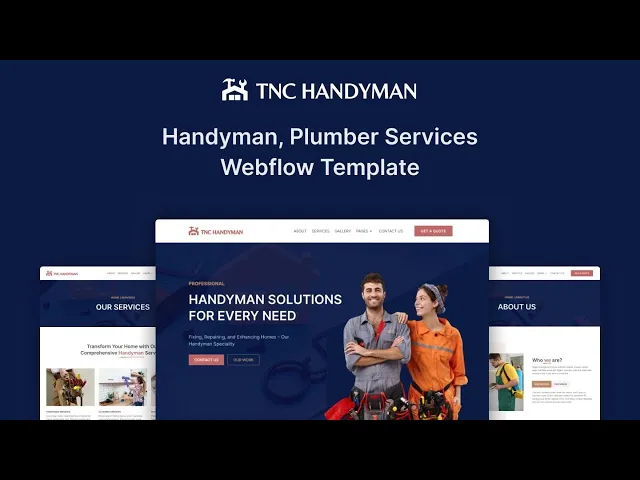


TNC Handyman is a handyman website template for home repair businesses, contractors and maintenance companies. It ships for Webflow, Framer, Figma and HTML.
The layout leads with your services, your project gallery and a quote request. So a homeowner with a leaking tap can find you and book you quickly. Because trade buyers judge on evidence, the gallery sits high on the homepage.
Each section has one job. The hero states which jobs you take on. The services list covers repairs, installations and maintenance. Then the gallery demonstrates finished work, and the quote page collects the enquiry. This is a static template, so there is no CMS to configure.
Explore the live preview now!
TNC Handyman at a Glance
| Formats | Webflow, Framer, Figma and HTML |
| Best for | Handymen, home repair businesses, contractors, maintenance companies |
| CMS | No, this is a static build |
| Pages | 8 |
| Responsive | Yes, on mobile, tablet and desktop |
| Support | TNCFlow support team |
Key Features of TNC Handyman
Modern design. The visual style is clean and professional without feeling corporate. So a small independent trader looks established rather than improvised. Photography and headings carry the page.

Service showcase. A dedicated services page describes each job you accept. Repairs, installations, assembly and seasonal maintenance all fit the structure. Because homeowners search by specific job, naming those jobs explicitly helps you get found.

Gallery showcase. A project gallery displays finished work as photographs. Pictures explain quality faster than paragraphs. So before and after shots belong here, especially for larger renovation jobs.

Effective sections. The build includes a hero, a services block, a testimonials section, a who we are section and social icons. Each part is styled already. That way you can remove whatever does not apply to your trade.

Modern and clean layout. Generous spacing keeps the page calm and legible. Buttons stay large enough to tap on a phone. However, the styling remains neutral, so it suits plumbers, electricians and general handymen equally.

Newsletter forms. Signup forms connect to your chosen platform and collect leads. Seasonal reminders work well for maintenance trades. So you can nudge past customers before winter or before spring.

Watch on YouTube
Watch the video walkthrough if you want an immediate tour. It demonstrates the pages, the sections and the styling in a few minutes.
Pages Included in TNC Handyman
TNC Handyman ships with 8 pages. Those are Home, About, Services, Contact, Get a Quote, a style guide, a licences page and a change log. Because the template is static, every page is edited directly rather than through a collection.
How to Use TNC Handyman
- Use the purchase widget on the right side of this page to buy the TNC Handyman template
- Follow the steps to prepare your site
- Replace the demonstration content with your own
- Adjust colours and typography if you want
- Then preview and publish
What Homeowners Look For on a Handyman Website
What does a homeowner check first? Usually coverage and availability. They want to know whether you serve their postcode and how soon you can attend. So put your service area and your response time near the top.
Proof comes next. Photographs of completed jobs, review counts and any trade accreditation all reduce hesitation. Insurance details matter too, because homeowners are letting a stranger into their property. Naming your public liability cover is a small line that removes a large objection.
Then comes friction. Many handyman enquiries arrive from a phone during a problem. However, long forms lose those visitors. A tap to call button and a three field quote form convert far better than a detailed intake page.
Pricing transparency is the last lever. Few trades publish fixed prices, and that is reasonable for variable work. However, a call out fee, an hourly rate or a typical range removes the biggest reason a visitor leaves. Publishing a starting figure filters out the enquiries you never wanted anyway.
Finally, think about individual job pages. Somebody searching for gutter cleaning or flat pack assembly rarely converts from a generic services list. So a short page per job earns traffic that a homepage cannot.
Frequently Asked Questions
What formats does TNC Handyman come in?
TNC Handyman ships for Webflow, Framer, Figma and HTML. Each format is purchased separately, so you can buy only the one your team will actually use.
Is the Figma file included with the Webflow purchase?
No. The Figma file is a separate product on this page. If you want the design source, purchase the Figma version alongside the Webflow, Framer or HTML build.
Does TNC Handyman include a CMS?
No. TNC Handyman is a static template, so content is edited directly on each page. That keeps the build simple and quick to launch.
How many pages does TNC Handyman include?
It includes 8 pages. Those are Home, About, Services, Contact, Get a Quote, a style guide, a licences page and a change log.
Can I use TNC Handyman for a trade other than handyman work?
Yes. The structure suits plumbers, electricians, decorators, landscapers and small building firms. You only need to rename the service sections.
Do I get support after buying TNC Handyman?
Yes. The TNCFlow support team answers setup and customisation questions after purchase.
When you choose TNC Handyman, you get support from the TNCFlow team. Ask us anything about setup, and we will help.
Check out other Webflow templates by TNCFlow.
Featured in our guides: construction website templates and cleaning website templates.





Select template
Choose one or more options for your build
All-Access Pass
$199
/ Yearly
$20,000+ in assets
130+ Webflow Templates
130+ Figma UI Templates
45+ Framer Templates
130+ HTML Templates
