

PRO

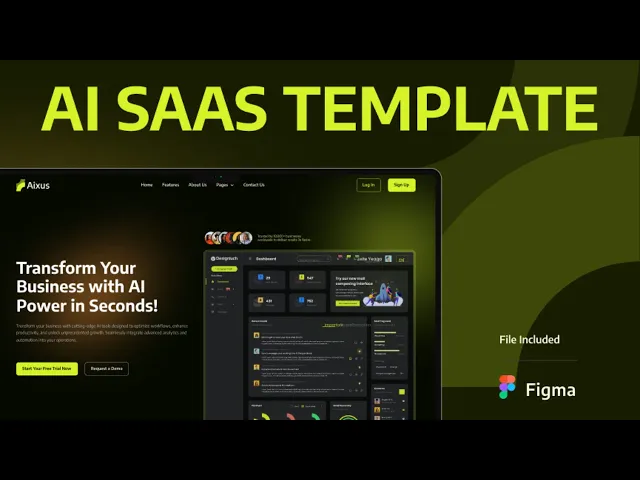


Aixus is a Webflow SaaS website template for AI tools, marketing automation platforms and software startups. It ships for Webflow, Figma and HTML.
SaaS buyers want two answers fast. What does the product do? And what does it cost? Aixus puts both up front. The hero states your offer, and the pricing block sits a short scroll away.
Every section has a job. The hero explains the product. Feature blocks show how it works. The pricing table handles objections. Testimonials and blog posts build trust. Because the build runs on Webflow CMS, your team can publish updates without a developer.
Pick the format that suits you. Aixus ships for Webflow, Figma and HTML. Need something custom instead? We also design and build sites from scratch.
Aixus at a Glance
| Formats | Webflow, HTML and Figma |
| Best for | AI tools, marketing automation, analytics platforms, B2B software and SaaS startups |
| CMS | Webflow CMS enabled |
| E-commerce | Not included |
| Responsive | Desktop, laptop, tablet and mobile |
| Key sections | Hero, feature blocks, pricing with monthly and yearly toggle, login and signup, blog, video and sliders, FAQ |
| Utility pages | Terms and conditions, FAQ, login, signup |
| Support | Included with every purchase |
Explore the live preview now!
What Makes a SaaS Website Convert
Clarity, mostly. Visitors need to grasp the product in one screen. So Aixus keeps the hero short and leads with a single promise. Feature sections then unpack the detail for people who want it.
Pricing is the other sticking point. Aixus includes a toggle so you can show monthly and yearly plans side by side. That way visitors compare without leaving the page. A clear plan table also reduces sales emails.
Who Should Use Aixus?
Aixus suits AI and automation startups, marketing platforms, analytics tools and B2B software teams. It also fits agencies that build SaaS products for clients.
Key Features That Set Aixus Apart
Trendy Premium Design: A clean, minimal layout that follows current design trends. Your site looks premium from day one.

CMS Functionality: Built on Webflow CMS. Publish blog posts, news and testimonials without touching code.

Pricing Information With Toggle: Show plans clearly, with a monthly and yearly switch. Visitors pick the right package faster.

Login and Signup Pages: Ready-made pages so users can create an account and manage their profile.

Impressive Blog Showcase: A blog layout built for scanning. Readers find the post they want quickly.

Video Sections and Responsive Sliders: Show your product in motion. Sliders highlight promotions on any screen size.

FAQ Showcase: A dedicated FAQ page that answers common questions and removes buying friction.

Terms and Conditions Page: A clear page covering licensing, acceptance, service use and liability.

Dedicated Customer Support: You get direct help from the TNCFlow support team whenever you need it.
How to Use Aixus
- Click here to purchase Aixus
- Follow the steps to get your site ready
- Replace the content with your own
- Adjust the design if you want
- Preview and publish
Aixus Frequently Asked Questions
Is Aixus suitable for an AI or automation SaaS product?
Yes. Aixus was built for software products, so it fits AI tools, automation platforms and analytics dashboards. You can swap the hero copy and feature blocks to match your category. The layouts stay the same.
Does Aixus include a pricing page with a monthly and yearly toggle?
Yes. Aixus ships with a pricing section that toggles between monthly and yearly plans. You can edit plan names, prices and features directly in Webflow.
Does Aixus include login and signup pages?
Yes. Aixus includes ready-made login and signup pages. They are designed to match the rest of the site, so you do not need a separate style pass.
Can I use Aixus without Webflow CMS?
Yes. The Webflow build ships with CMS collections for the blog and testimonials. However, you can switch them off and run static pages instead. The HTML build is already static, and the Figma file has no CMS.
What is the difference between the Webflow, HTML and Figma versions?
The Webflow build is ready to publish, with CMS and interactions. The HTML build is static, so you can host it anywhere. The Figma file is the source design, which suits teams who want to restyle before development. All three share the same layouts.
Do I need coding skills to edit Aixus?
No. The Webflow build is fully visual, so you edit text and images on the canvas. The HTML build needs a developer for structural changes. The Figma file is for designers.
Ready to Launch Your SaaS Website?
Aixus gives SaaS teams a site that is ready to launch. It explains your product clearly, shows your pricing openly and turns visitors into trials.
Explore all templates by TNCFlow.
Featured in our guides: Webflow AI templates, Webflow SaaS templates and HTML5 website templates.


Select template
Choose one or more options for your build
