
FREE
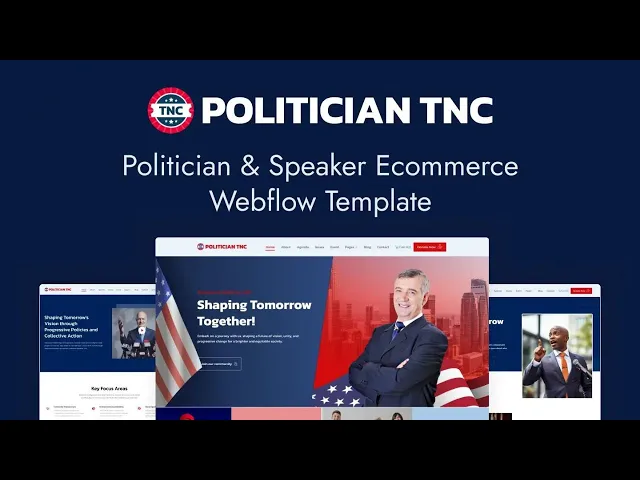


Politician TNC is a political website template for candidates, parties, campaigns and advocacy groups. It ships for Webflow, Framer, Astro, Figma and HTML.
A campaign site has to do three things at once. It must state what you stand for, collect money, and turn readers into volunteers.
So Politician TNC gives each of those its own route. Issues and movements run on the CMS, the donate page takes the money, and the volunteer page signs people up. Because it ships in a CMS version and an ecommerce version, you can add merchandise when you need it.
Each section has one job. The hero introduces the candidate. The issues make the argument. The donate page funds it. Finally the volunteer page builds the ground team.
Check out the live preview, or the ecommerce version preview.
Politician TNC at a Glance
| Formats | Webflow, Framer, Astro, Figma, HTML |
| Best for | Political candidates, parties, campaigns, advocacy groups, nonprofits |
| Versions | CMS version and ecommerce version, same design |
| CMS | Issues, issue categories, movements, events, speakers, blog posts, authors and tags |
| Pages | 12 designed pages plus Webflow ecommerce pages and CMS templates |
| Key sections | Agenda, issues, movement, donate, volunteer, shop |
| Support | Included with every TNCFlow purchase |
Key Features of Politician TNC
Layout Built for a Campaign. The homepage leads with the candidate and the message. Because a voter decides in seconds, nothing else competes for that space.

Responsive and Editable Design. The design is clean and neutral. So a party colour scheme drops in without a rebuild.

Campaign and Pledges. Policy commitments get their own space rather than a paragraph on the homepage. Then a voter can check one promise without reading all of them.

Merchandise Shop. The ecommerce variant ships a shop with eight demo products, running on Webflow native ecommerce. So badges and shirts fund the campaign directly.

CMS Included. Issues, issue categories, movements, events, speakers and blog posts all run on Webflow CMS. Then a new policy page is a form entry.

Background and Record. An about page carries the candidate’s history and record. Since scrutiny is the point, that page does real work.

Blog in Two Layouts. The blog ships with and without a left sidebar. So campaign updates and long policy pieces can sit differently.

Agenda Page. The agenda page sets out priorities in order. However, it stays short enough that a voter reads to the end.

Donate and Volunteer Pages. A donate page and a volunteer sign up page ship as standard. So the two things a campaign actually needs are never more than one click away.
Issues and Movements. The demo ships eight issue categories and eight movements, covering human rights, the environment, public service and more. Each one gets its own page.
Watch on YouTube
You can watch this video if you want to learn everything about this Webflow template quickly. In this video, we have demonstrated the information about this Webflow template.
Pages Included in Politician TNC
Politician TNC ships with twelve designed pages. They are Home, About, Agenda, Issues, Movement, Events, Donate, Volunteer, Blog, Blog with Left Sidebar, Contact and a Shop page in the ecommerce version. Style guide, license, a 404 page and a password page ship alongside them. In the ecommerce version you also get checkout, PayPal checkout and order confirmation. Further CMS templates render issues, issue categories, movements, events, speakers, blog posts, authors, blog categories and blog tags.
Why an Issues Page Wins Votes a Homepage Cannot
A voter rarely searches for a candidate by name. They search for the thing they care about. However, most campaign sites bury policy in one long page that ranks for nothing. Politician TNC gives every issue and every movement its own CMS page instead. So a search about housing or veterans benefits can land on the page that answers it, in your words rather than a journalist’s. Then the donate and volunteer pages are one click from someone who already agrees with you, which is the only traffic worth having.
How to Use Politician TNC
- Use the purchase widget on the right side of this page to buy the Politician TNC template
- Pick the CMS version or the ecommerce version depending on whether you will sell merchandise
- Duplicate the template into your Webflow workspace
- Replace the demo candidate, issues and photography with your own
- Connect the donate and volunteer forms to your campaign tools
- Check every breakpoint, then publish your site
Politician TNC Frequently Asked Questions
What formats does Politician TNC ship in?
Politician TNC ships for Webflow, Framer, Figma and HTML. Each format is sold separately, so you buy only the one you need.
What is the difference between the CMS and ecommerce versions?
Both share the same design. The ecommerce version adds a shop, product pages and Webflow checkout, so pick it if you plan to sell merchandise.
Is the Figma file included with the Webflow purchase?
No. The Figma file is a separate product on this page. So add it to your order if you want the design source.
Can supporters donate through the template?
Yes. A dedicated donate page ships as standard, and a volunteer sign up page sits alongside it.
What CMS collections are included?
Issues, issue categories, movements, events, speakers, blog posts, authors, categories and tags. The demo ships eight issue categories, eight movements and six events.
Can Politician TNC be used outside a campaign?
Yes. Nonprofits, advocacy groups and community organisations use the same structure, since the issues and movements collections fit any cause.
When you choose Politician TNC, you get support from the TNCFlow team. So if a section does not behave, ask us and we will help.
Check out other Webflow templates by TNCFlow.
Featured in our guides: nonprofit website templates.

Select template
Choose one or more options for your build
