

PRO

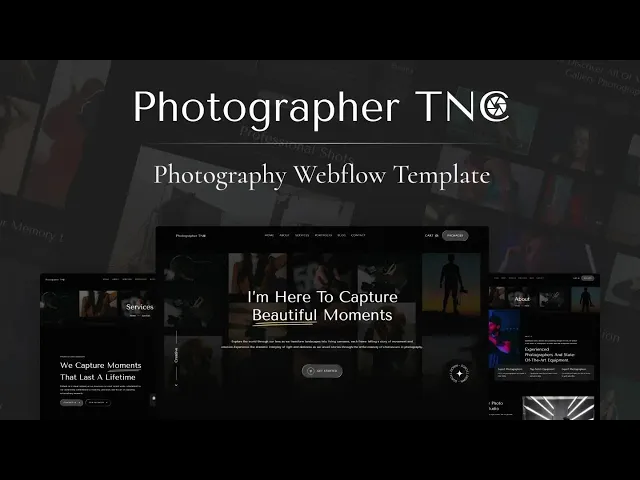


Photographer TNC is a photography website template for portrait photographers, wedding studios and video agencies. It ships for Webflow, Astro, Framer, Figma and HTML.
The build carries 15 pages, including a portfolio collection, a packages collection and a full blog, so a working studio site goes live without any custom development. There is also an ecommerce build of the Webflow version, which lets you sell photography packages directly from the site.
Each section has one job. The home page opens with the imagery, while the portfolio pages carry the individual projects. Then the packages page handles the money conversation. So a visiting client never has to hunt for the next step.
Explore the live preview to see the template in motion.
Photographer TNC at a Glance
| Formats | Webflow, Framer, Astro Figma and HTML |
| Webflow builds | Standard CMS and ecommerce |
| Best for | Portrait and wedding photographers, videographers, creative agencies |
| CMS | Webflow CMS for portfolio items, packages and blog posts |
| Pages | 15 |
| Responsive | Yes, on desktop, tablet and mobile |
| Support | Included with every purchase |
Key Features of Photographer TNC
Built around photography. The template contains the pages a working photography business actually needs, including portfolio, services, packages, blog and contact. However, the layout is flexible enough for adjacent creative work such as film and design.

Modern, restrained design. The visual identity stays deliberately quiet, because the photography has to be the loudest thing on the screen. So generous whitespace and understated typography do the framing.

Portfolio showcase. The portfolio collection presents each project on its own page. That way a single wedding or campaign gets room for a full gallery, rather than one thumbnail in a grid.

Biography and background. The about page tells the story behind the work. Clients hiring a photographer are hiring a person, so a credible biography moves the decision more than another gallery.

Animations and sliders. Motion is used sparingly across hero sections and galleries. Because photography sites live or die on load speed, the transitions stay light rather than decorative.

Service and package showcase. Packages run as a CMS collection with its own category template, so you can publish wedding, portrait and commercial tiers separately and update pricing in one place.

Contact and booking. The contact page pairs an enquiry form with a booking section, so a prospective client can ask a question or reserve a date without picking up the phone.

Blog showcase. The blog carries recent shoots, gear notes and studio updates. Then those posts feed the search traffic that a portfolio page alone will never earn.

Dedicated support. When you buy Photographer TNC, the TNCFlow support team stands behind the purchase, and a real person answers your setup and customization questions.
Watch on YouTube
Watch the walkthrough video for a quick tour of every page in the template.
Pages Included in Photographer TNC
- Home
- About
- Services
- Packages
- Blog
- Contact
- Portfolio
- Portfolio item template
- Packages template
- Package category template
- Blog post template
- Author template
- Blog category template
- 404
- Password
How to Use Photographer TNC
- Use the purchase widget on the right side of this page to buy the Photographer TNC template
- Follow the steps to get your site ready
- Replace the demo content with your own
- Adjust the design if you want
- Preview & Publish
What to Look For in a Photography Website Template
Photography sites fail for a predictable reason. The images are enormous, so the page loads slowly and the visitor leaves before the hero has even rendered. Check the demo on a mobile connection first.
Next, look at how projects are stored. A portfolio built from static pages means rebuilding markup for every shoot, however a CMS collection lets you add a gallery in minutes.
Then find the pricing. Many photography templates hide the packages page entirely, which forces every enquiry through a form. That costs you the clients who wanted a number before they wrote to you.
Finally, check the enquiry path. A booking section, a working form and a visible response promise convert far better than a bare email address in the footer.
Frequently Asked Questions
What formats does Photographer TNC come in?
Photographer TNC ships for Webflow, Framer, Figma and HTML. Each format is purchased separately, so you only pay for the one your project actually needs.
Can I sell photography packages with Photographer TNC?
Yes. There is an ecommerce build of the Webflow version, which adds a checkout so clients can buy packages directly.
How many pages does Photographer TNC include?
The template includes 15 pages. Seven are static pages and the rest are dynamic collection templates for portfolio items, packages, blog posts and authors.
Does Photographer TNC include a blog?
Yes. The blog runs on Webflow CMS with post, author and category templates, so you can publish shoot write ups alongside the portfolio.
Is the Figma file included with the template?
No. The Figma file is sold as a separate product on this page, so you buy it only if your team needs the design source.
Is Photographer TNC mobile responsive?
Yes. Every page adapts across desktop, tablet and mobile breakpoints, which matters because most portfolio traffic arrives from a phone.
Need help? The TNCFlow support team answers questions about setup, the CMS and customization.
Check out other Webflow templates by TNCFlow.
Featured in our guides: Figma portfolio templates, photography website templates and Webflow portfolio templates.



Select template
Choose one or more options for your build
