

PRO




TNC Crypto is a crypto website template for exchanges, wallets and blockchain startups. It ships for Webflow, Figma and HTML.
There are two Webflow builds. The static build is a single scrolling home page plus a contact page and a licensing page. The CMS build runs to 16 pages, so it adds a second home layout, an about page, a team page, pricing, an FAQ page and seven blog layouts.
Each section has one job. The hero states the promise, then the market table, the platform explainer, the benefit grid and the roadmap answer the next objection in sequence. Because a cryptocurrency reader is sceptical by default, that sequence matters considerably more than the decoration does.
The theme is dark navy with teal and yellow accents. However, the blog and content pages sit on a light background, so long reading stays comfortable.
Explore the live preview now.
TNC Crypto at a Glance
| Formats | Webflow, Figma and HTML |
| Webflow builds | Static and CMS, sold separately |
| Best for | Crypto exchanges, wallets, blockchain startups, token projects, trading platforms, crypto education sites |
| Pages | 16 in the CMS build, 3 in the static build |
| CMS | Webflow CMS in the CMS build, driving the blog |
| Theme | Dark navy with teal and yellow accents |
| Responsive | Yes, on desktop, tablet and mobile |
| Support | Included, direct from the TNCFlow team |
Who Should Choose TNC Crypto?
The layout suits any business that has to explain a digital asset before it can sell one. So it fits exchanges, custodial and self custody wallets, token projects, blockchain startups, trading tools, mining services and crypto education sites. Because the design leans on charts, tables and roadmaps, it works best when you have real numbers to put in them.
Key Features of TNC Crypto
Home Page Hero and Logo Strip: The hero pairs a short claim with an isometric illustration and two buttons. Then a partner logo strip runs straight underneath it. So the first screen states the promise and shows who already trusts you.

Platform Explainer Sections: A split section pairs an illustration with three short talking points. Because most crypto buyers stall on the same three doubts, that is enough space to answer them without a wall of text.

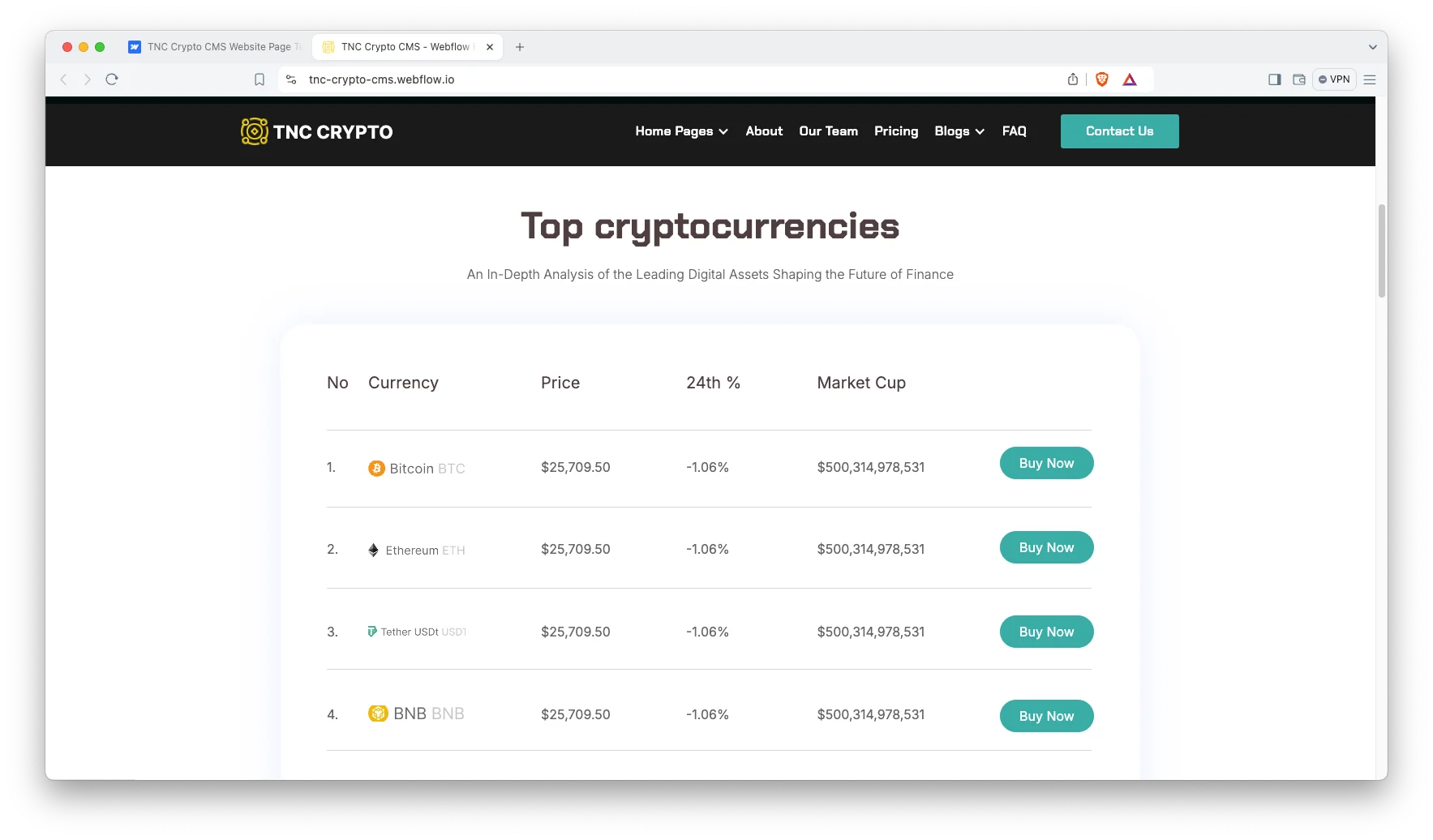
Top Cryptocurrencies Table: A market table lists coins with price, 24 hour change, market cap and a buy button. It is a designed layout, not a live price feed. So you connect your own data source, or you edit the rows by hand.
Team Page: The CMS build carries a dedicated team page with a portrait grid. Because trust is the whole sale in this category, putting real faces on the site does more work than another feature list.

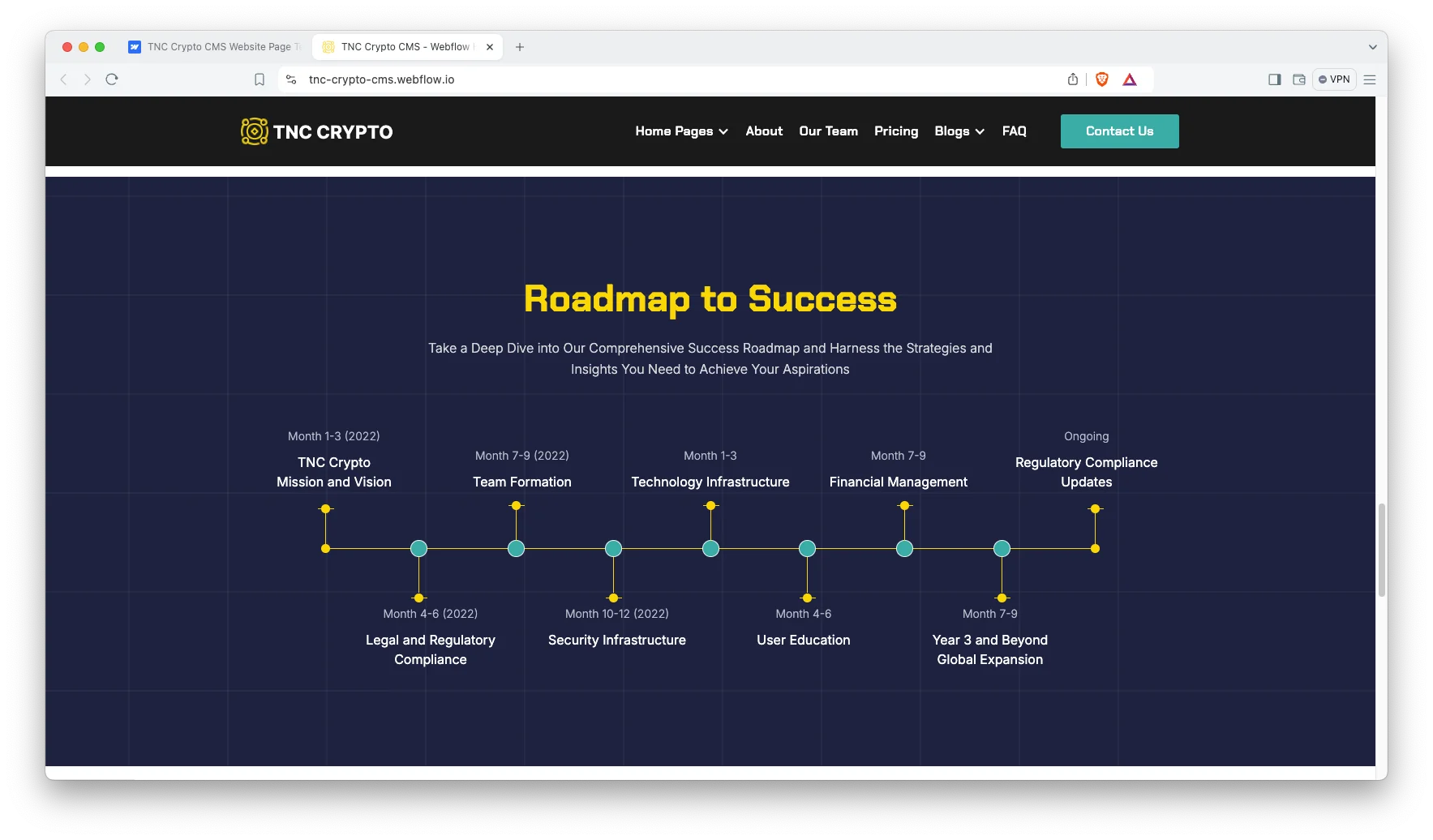
Roadmap Timeline: A horizontal roadmap plots milestones above and below a single line. So a token project can show what shipped and what is next in one screen. Then investors stop asking for a deck.
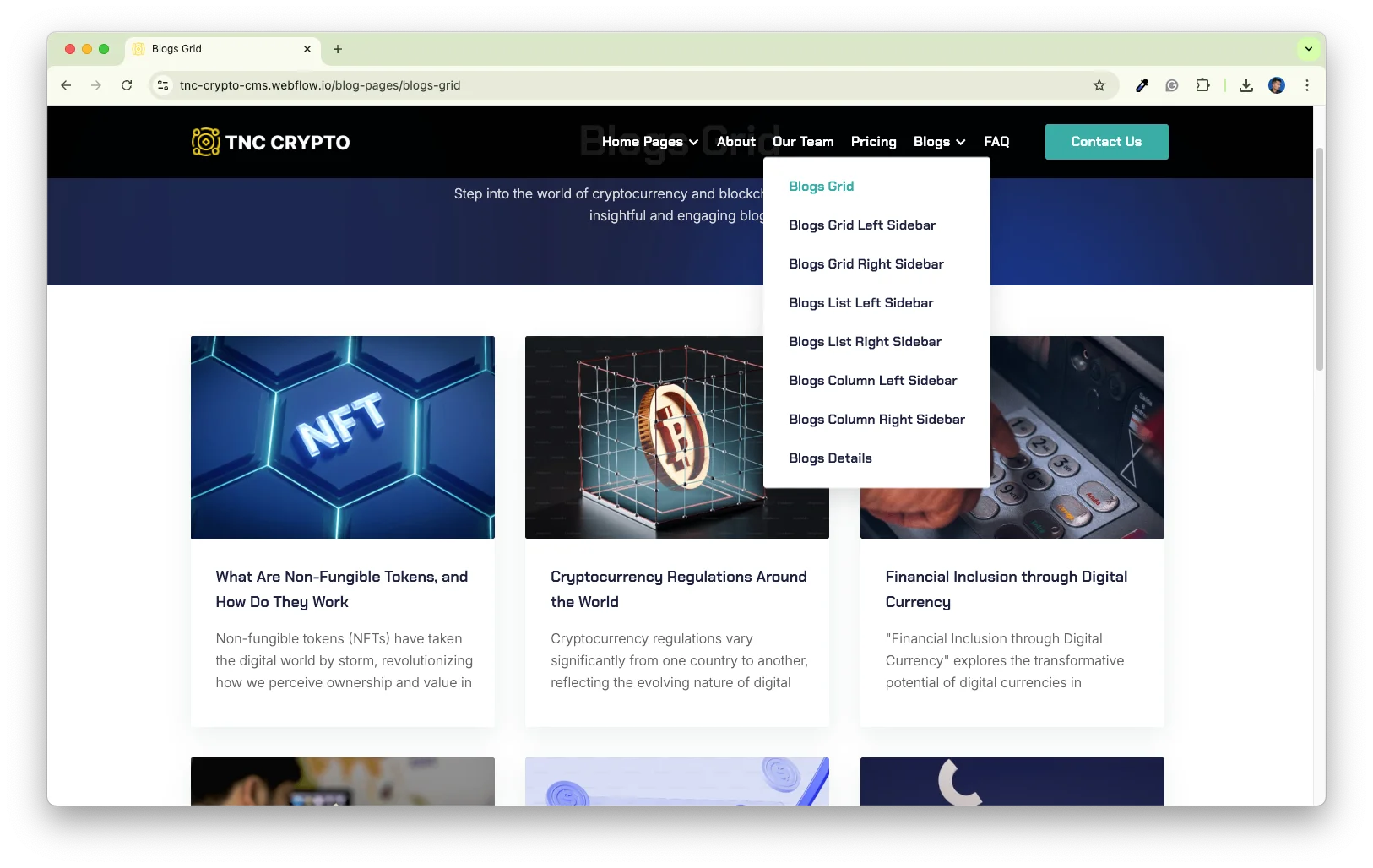
Seven Blog Layouts: The CMS build ships grid, list and column blog layouts, each with a left or right sidebar option. So you can pick the shape that fits your posts. Every layout reads from the same Webflow CMS collection, which means one post appears everywhere at once.
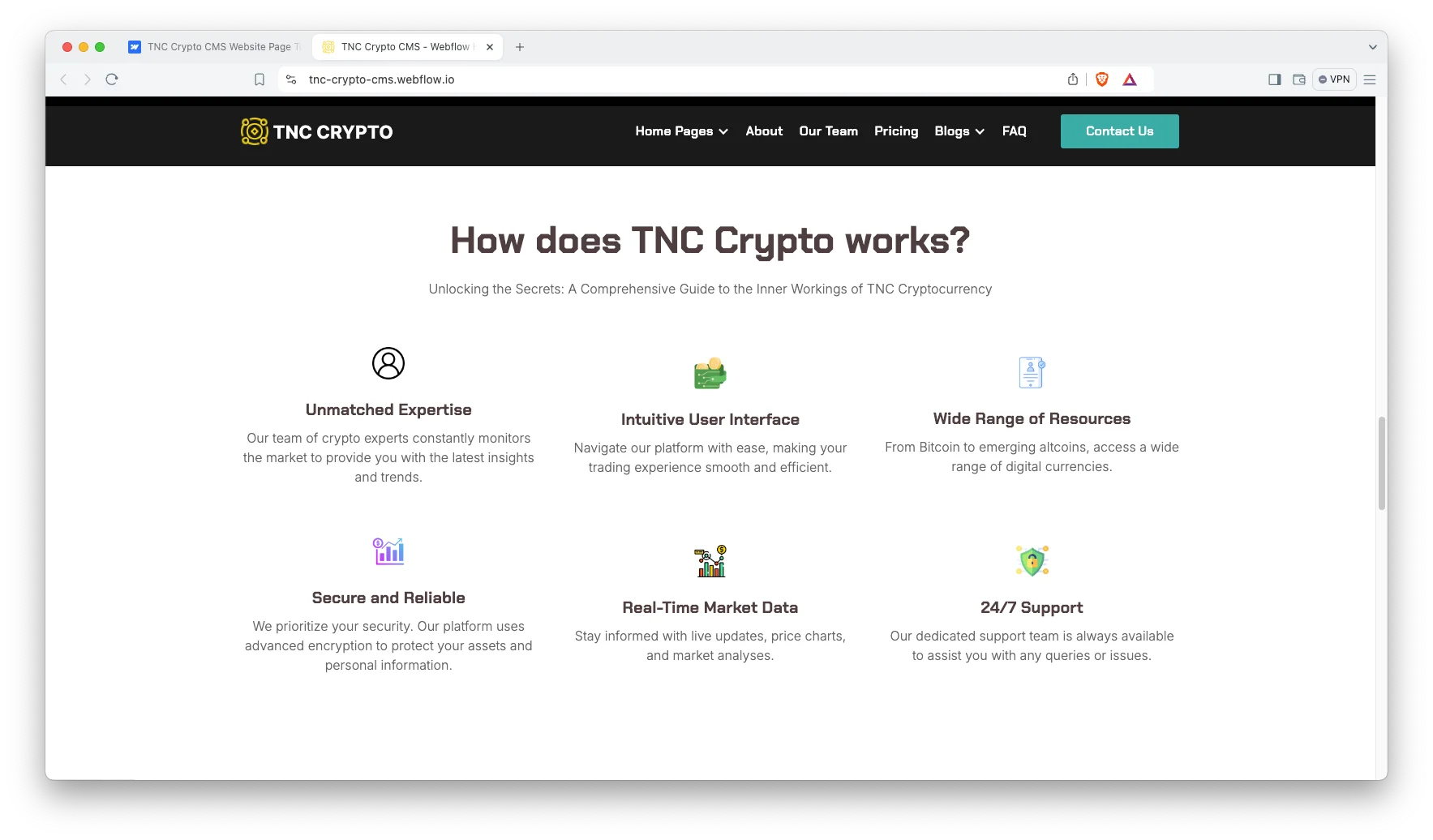
Benefit Icon Grid: A six card grid covers expertise, interface, coverage, security, market data and support. Because it sits above the pricing table, it answers the objection before the number arrives.
Pricing and FAQ: Three pricing tiers sit side by side with a feature list under each. An FAQ block follows, and the CMS build gives it a page of its own. So plan questions and trust questions get answered in the same scroll.
Newsletter and Contact Forms: A newsletter form sits in the footer of every page, and the contact page carries a full enquiry form. Both are Webflow forms, so submissions land in your Webflow dashboard without any extra setup.
Watch on YouTube
The walkthrough below tours the template, so you can judge the suitability before purchasing.
Pages Included in TNC Crypto
The CMS build has 16 pages. The blog post layout is a CMS template, so it builds a page for every post you add.
- Home, multi page
- Home, landing page
- About Us
- Our Team
- Pricing
- FAQ
- Contact
- Licensing
- Blogs Grid
- Blogs Grid Left Sidebar
- Blogs Grid Right Sidebar
- Blogs List Left Sidebar
- Blogs List Right Sidebar
- Blogs Column Left Sidebar
- Blogs Column Right Sidebar
- Blog Post Template
The static build keeps the home page, the contact page and the licensing page. So it suits a single product launch rather than a content programme.
How to Use TNC Crypto
Setup is straightforward. Here are the steps.
- Use the purchase widget on the right side of this page to buy the TNC Crypto template
- Follow the steps to get your site ready
- Edit the hero, the navigation and the brand story to match your project
- Replace the sample coins, roadmap milestones and team members with your own
- Add your posts to the blog collection if you bought the CMS build
- Preview, then publish
What a Crypto Site Has to Prove
Crypto buyers arrive suspicious, and they are right to. So a template only helps if it gives you room to answer the doubts rather than decorate around them.
First, identify the people. An anonymous team reads as a red flag in this category, which is why the dedicated team page matters more here than it would on an ordinary software marketing site. Then add genuine names, photographs and professional profile links.
Second, be exact about custody arrangements. Who actually holds the private keys? State the answer in plain language near the top of the page, because that single detail decides suitability for most serious readers.
Third, publish the complete fee structure. Hidden spreads and unexpected withdrawal charges remain the most common complaint in this category. However, a simple published fee table converts that complaint into a genuine reason to trust the operator.
Next, handle the regulatory question directly. Name the legal entity that operates the service and the jurisdiction where it is registered. If the business holds no licence anywhere, disclose that as well, because being caught concealing it is considerably worse.
Finally, keep the market data honest. A static table of rounded numbers ages badly, so either connect it to a genuine price feed or remove the section entirely. That is a decision worth resolving before launch rather than afterwards.
Frequently Asked Questions
What is TNC Crypto?
TNC Crypto is a crypto website template for exchanges, wallets and blockchain startups. It comes in two Webflow builds. The static build is a single scrolling home page plus contact and licensing, and the CMS build runs to 16 pages with a blog.
Which formats does TNC Crypto ship in?
TNC Crypto ships for Webflow, Figma and HTML. The Webflow static build and the Webflow CMS build are sold as separate products. There is no Framer version and no WordPress version.
What is the difference between the static and CMS builds?
The static build has three pages and no CMS collections, so every edit happens in the Webflow Designer. The CMS build has 16 pages, a second home layout, a team page and seven blog layouts driven by Webflow CMS.
Does TNC Crypto show live cryptocurrency prices?
No. The market table is a designed layout with sample rows, not a live price feed. So you either connect your own data source or edit the rows yourself.
Can TNC Crypto handle trading or payments?
No. It is a marketing website template, so the buy buttons and forms are front end only. You would connect your own exchange, wallet or payment provider behind them.
Is the Figma file included with the template?
No. The Figma file is a separate product, and you can buy it on its own from the purchase widget on this page.
When you choose TNC Crypto, you get support direct from the TNCFlow team. So if a section will not behave, just ask us.
Check out other Webflow templates by TNCFlow.



Select template
Choose one or more options for your build
All-Access Pass
$199
/ Yearly
$20,000+ in assets
130+ Webflow Templates
130+ Figma UI Templates
45+ Framer Templates
130+ HTML Templates
