
PRO

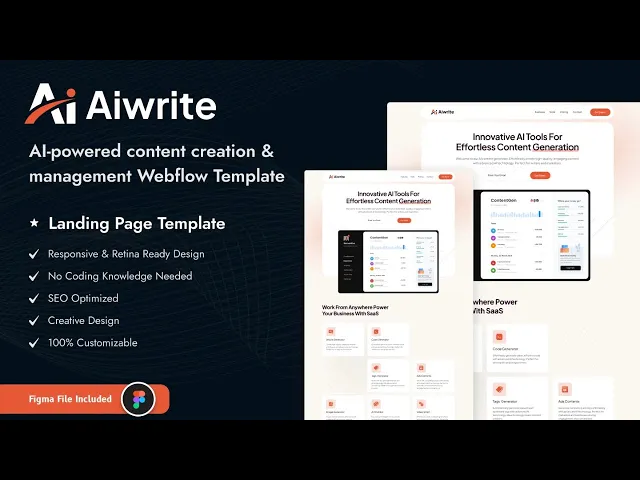


Aiwrite is an AI website template for AI content tools, SaaS startups and software launches. It ships for Webflow, Figma and HTML.
Aiwrite is a one page landing template, so the whole pitch lives on a single scroll. The hero states the promise and captures an email, then a tool grid explains what the product does, then pricing and testimonials close the deal. Because there is no navigation to get lost in, a visitor either converts or leaves quickly.
Every section has a single job. The feature grid names the individual tools, the detail blocks go deeper on two of them, the pricing table handles objections, and the testimonial slider supplies proof. Nothing repeats itself.
There is no CMS in this build. That is deliberate, because an early stage AI product usually needs one strong page rather than a publishing system. So the Webflow, HTML and Figma versions all carry the same static structure.
Explore the live preview now!
Aiwrite at a Glance
| Formats | Webflow, HTML, Figma |
| Best for | AI content tools, SaaS startups and software launches |
| Layout | One page, with anchor links to features, pricing and testimonials |
| CMS | None, this is a static build |
| Pages | 7 total: the landing page plus 6 supporting pages |
| Pricing section | Three tiers with a monthly and yearly toggle |
| Responsive | Desktop, tablet and mobile breakpoints |
| Support | Direct help from the TNCFlow team |
Key Features of Aiwrite
Clean, product first design. Aiwrite uses a restrained palette with generous spacing around the interface screenshots. Because the layout stays quiet, your product imagery does the talking. The hero pairs a headline with a short email capture form, so the first interaction costs a visitor almost nothing.

A feature grid that names every tool. The demo lists seven distinct capabilities: article generator, code generator, tags generator, ads content, image generator, chat bot and video script. So a visitor understands the scope of your product in one glance, rather than reading a paragraph of abstractions.

Pricing table with a monthly and yearly toggle. Three tiers sit side by side, and one click switches the whole table between monthly and annual rates. That answers the first question a SaaS buyer asks, and it makes the annual discount obvious.

Testimonial slider with star ratings. The testimonial carousel carries a photo, a name, a role, a quote and a star rating. Because social proof sits directly under pricing, it lands exactly where hesitation happens.

Benefits block with a product mockup. A dedicated section pairs a checklist of outcomes with a dashboard mockup, so buyers see the interface before they sign up. Because Aiwrite is a static build with no CMS collections behind it, there is also less to configure and less to load than in a multi page site.

Responsive across every breakpoint. The hero, the tool grid, the pricing table and the testimonial slider all reflow for desktop, tablet and mobile. So the pricing table stays readable on a phone, which is where most first visits arrive.

Watch on YouTube
This walkthrough covers the tool grid, the pricing toggle and the testimonial slider.
Pages Included in Aiwrite
Aiwrite contains seven pages. The main one is the long form landing page, with anchor links to features, pricing and testimonials. The rest are supporting pages: Privacy Policy, Terms and Services, License, Style Guide, Password and a custom 404.
How to Use Aiwrite
- Choose the format you want, then complete the purchase.
- Use the purchase widget on the right side of this page to buy the Aiwrite template
- Open the Webflow project in the Designer, or open the HTML and Figma files in their own applications.
- Replace the tool cards, pricing tiers and testimonials with your own.
- Point the hero form and the newsletter form at your email tool.
- Check every breakpoint, then publish.
Why an AI Product Usually Needs One Page, Not Ten
Early stage AI products change fast, and a ten page site becomes stale before the second release. So a single landing page is easier to keep honest, because there is one place to update when the feature list moves.
Next, think about what a visitor actually needs. Someone evaluating an AI tool wants three things: what it does, what it costs, and whether anyone else trusts it. A one page layout puts all three in the same scroll, in that order.
Finally, plan for the upgrade. When the product matures and you start publishing, you can add a CMS blog to the same Webflow project later. Aiwrite gives you the launch page now, without paying for structure you cannot fill yet.
One caution is worth naming. A single page has one shot at ranking, so the copy in each section has to earn its keep. Write the feature cards in your customers’ language rather than your own, and put a real number in the pricing table instead of a request for a quote.
Frequently Asked Questions
Is Aiwrite a one page template?
Yes. The main landing page carries the whole pitch, with anchor links to the features, pricing and testimonial sections. Six supporting pages handle legal, style guide and error states.
Does Aiwrite include a CMS?
No. Aiwrite is a static build with no CMS collections. You can add a Webflow CMS blog to the project later if you start publishing.
Does the pricing section support monthly and yearly plans?
Yes. The pricing table has a monthly and yearly toggle, and it switches all three tiers at once.
Is the Figma file included with the Webflow version?
Yes. The Webflow purchase includes the Figma file at no additional cost. You can also buy the Figma file on its own if you only need the design.
Can I use Aiwrite for a SaaS product that is not AI?
Yes. The structure suits any software launch, so a developer tool, an analytics product or a productivity app all fit. You would simply rename the tool cards.
Is Aiwrite responsive?
Yes. Every section is built for desktop, tablet and mobile, including the pricing table and the testimonial slider.
When you choose Aiwrite, you get support from the TNCFlow team. Our specialists answer setup questions quickly.
Check out other Webflow templates by TNCFlow.
Featured in our guides: Webflow AI templates, Webflow SaaS templates and Webflow portfolio templates.


Select template
Choose one or more options for your build
All-Access Pass
$199
/ Yearly
$20,000+ in assets
130+ Webflow Templates
130+ Figma UI Templates
45+ Framer Templates
130+ HTML Templates
